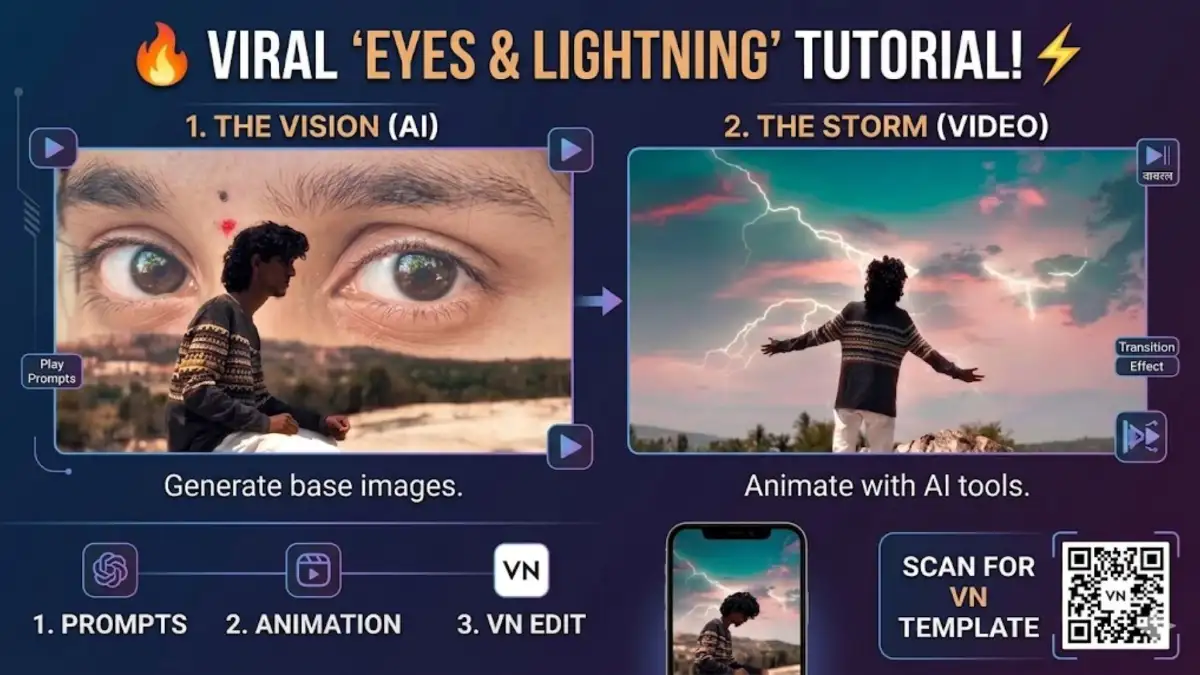
Instagram aur YouTube par aajkal cinematic aur mystical AI videos kaafi trend kar rahe hain. Khaas karke wo videos jisme background me badi aakhein (giant eyes) dikhti hain aur achanak se scene change hokar lightning (bijli) wale aasman me badal jata hai.
Agar aap bhi aisi mind-blowing video banana chahte hain, toh aap bilkul sahi jagah par hain. Is article me hum aapko step-by-step batayenge ki pehle AI Image kaise banaye, fir usko Video me kaise convert karein, aur end me VN Video Editor (with VN Code) me usko edit kaise karein.
🎨 Step 1: AI se Perfect Images Generate Karein
Video banane se pehle hume do main images chahiye. Aap in images ko generate karne ke liye kisi bhi free ya paid AI tool ka use kar sakte hain (jaise Bing Image Creator, Midjourney, ya Leonardo AI).
Image 1: Badi Aankhon Wala Scene (The Giant Eyes)
Is image ke liye niche diye gaye prompt ko copy-paste karein:
Prompt: A highly cinematic shot of a young man with curly dark hair sitting contemplatively on barren ground, side profile. In the massive background sky, there are two huge, hyper-realistic human eyes with a small red bindi looking directly forward. The eyes blend seamlessly into the desert-like hills. Soft, mystical lighting, 8k resolution, photorealistic.
Image 2: Bijli aur Aasman Wala Scene (The Lightning Sky)
Is image ke liye ye prompt use karein:
Prompt: A dynamic back-view shot of a young man with curly hair standing on a high mountain peak with his arms widespread. He is embracing a dramatic, magical sky filled with vivid pink, turquoise, and purple clouds. Multiple bright, jagged lightning strikes are flashing across the sky. Epic, powerful mood, cinematic lighting.
🎬 Step 2: Images ko Video me Convert Karein (Animation)
Images ready hone ke baad, hume inme jaan daalni hai. Iske liye best AI video generators jaise Kling AI, Runway Gen-3, ya Luma Dream Machine ka use karna sabse badhiya rahega. High-quality motion ke liye Kling AI ek behtareen option hai.
Image 1 (Eyes Scene) ke liye Video Prompt:
- Prompt in AI Tool: Slow motion zoom out. Add soft white smoke swirling slowly around the boy. The giant eyes in the background should have a subtle, lifelike reflection. Mystical atmosphere.
Image 2 (Lightning Scene) ke liye Video Prompt:
- Prompt in AI Tool: Dynamic motion. The vivid clouds are moving slowly. Intense, bright lightning strikes flashing repeatedly across the sky. The boy stands completely still. Cinematic epic camera angle.
Dono videos ko generate karke apne phone ya PC me download kar lijiye.
Capcut Template ka Use Karein
🔥 Pro SEO Tips for Viral Reach
Jab aap is video ko upload karein, toh in hashtags ka use zarur karein:
#AIVideo #VNVideoEditor #TrendingReels #CinematicAI #MidjourneyArt #KlingAI #VNCodeTutorial #VideoEditingTips
Conclusion:
AI aur VN Editor ka combo use karke aap kuch hi minto me aisi high-quality videos bana sakte hain jo millions me views laa sakti hain. Aaj hi try karein aur apni creativity duniya ko dikhayein!