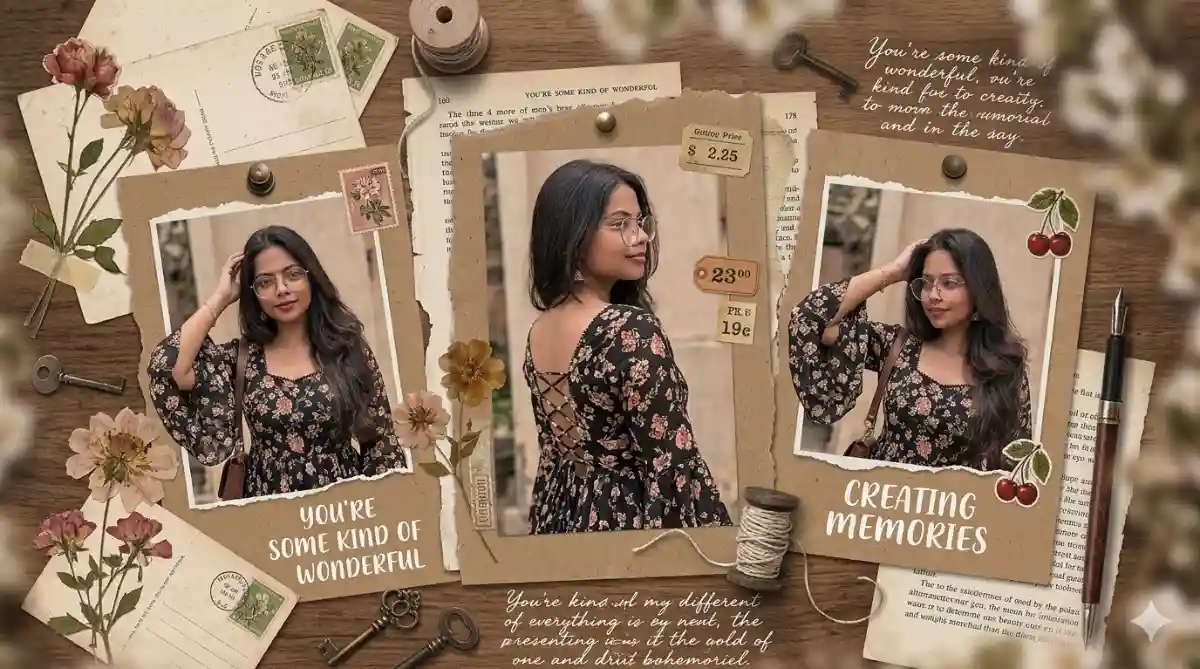
Viral Scrapbook AI Collage: If you have been scrolling through Instagram or TikTok lately, you have definitely seen the viral “Scrapbook Collage” aesthetic trend. It starts with a normal video of someone posing, and then seamlessly transitions into a stunning, vintage-style AI scrapbook collage featuring three different photos, torn paper edges, and aesthetic quotes.
It looks like hours of Photoshop work, but thanks to AI and CapCut, you can create this in under 5 minutes! Here is the complete, step-by-step guide to making this trending reel and boosting your views.
What You Need:
- A short video of yourself or your subject posing (around 3-5 seconds).
- An AI Image Generator (Midjourney is best for realistic results, but Bing Image Creator/Copilot works too).
- The CapCut video editing app installed on your phone.
Step 1: Generate the Viral Scrapbook AI Collage Image Using AI
The secret sauce to this trend is the AI-generated image. We are going to use an “Image-to-Image” prompt. This means you will upload a screenshot from your original video into your AI tool so the final collage looks just like you!
How to do it in Midjourney:
- Take a clear screenshot of the person in the video.
- Upload that image to your Midjourney Discord chat and copy the image link.
- Type
/imagine, paste your image link, and then paste one of these “God-Level” prompts right after it.
Prompt 1 (Dark Floral Theme):
A vertical aesthetic Pinterest-style scrapbook collage featuring three photos of a beautiful young woman. She is wearing wire-rimmed round glasses and a black bohemian dress with a vibrant floral pattern and wide bell sleeves. The middle photo is a side profile highlighting a criss-cross lace-up design on the back, set in a sunny garden. The photos are arranged vertically, separated by torn vintage kraft paper edges. The collage background features brown textured paper, dried pressed flowers, vintage botanical illustrations, small cherry stickers, and handwritten notes that say “you’re some kind of wonderful”. Soft natural sunlight, photorealistic, highly detailed, Instagram aesthetic. –ar 9:16 –v 6.0
Prompt 2 (White Lace Theme):
A vertical aesthetic Pinterest-style scrapbook collage featuring three photos of a beautiful young woman. She is wearing wire-rimmed round glasses and a white bohemian kurti dress with delicate floral prints and lace-trimmed bell sleeves. The middle photo is a side profile highlighting a criss-cross lace-up design on the back, set in a sunny outdoor environment. The photos are arranged vertically, separated by torn vintage kraft paper edges. The background features brown textured paper, dried pressed leaves, vintage botanical stamps, and aesthetic handwritten quotes. Soft natural sunlight, photorealistic, highly detailed, trendy Instagram reel aesthetic. –ar 9:16 –v 6.0
Pro Tip: Change the clothing description in the prompt to match whatever the person in your video is wearing!
Step 2: Combine and Edit Using CapCut
Now that you have your original video and your generated AI scrapbook image, it is time to make the reel.
- Find the Template: Open Instagram and search for reels using the “Scrapbook Photo Transition” CapCut template. Alternatively, search “Scrapbook template” directly inside the CapCut app.
- Apply Your Media: Click on “Use Template in CapCut”.
- Select Your Files: The template will ask for two clips.
- Clip 1: Select your original, normal video.
- Clip 2: Select the AI scrapbook collage image you just generated.
- Preview & Export: CapCut will automatically align the transition to the viral beat. Preview the video to ensure it looks smooth, then click Export (choose the “Export without watermark” option if you want a clean video for Instagram).
Step 3: Post and Go Viral 🚀
Your video is ready! To maximize your reach:
- Audio is Key: Make sure you are using a trending audio track on Instagram. Usually, the CapCut template links directly to the trending song.
- Keep the Caption Short: Let the visual transition do the talking. Something simple like “Obsessed with this AI scrapbook trend 📸✨” works perfectly.
- Call to Action: Ask your followers a question to boost engagement (e.g., “Should I drop the prompt I used in the comments?”).
This trend is highly engaging because it surprises the viewer. Try it out, experiment with different prompts, and watch your engagement skyrocket!